Microsoft

O365 first impression

Since yesterday I’m a happy subscriber of Office 365 P1 plan. I now have 25 GB Exchange mailbox (using only 0,5 GB), Lync IM (awesome), Sharepoint site (quite useless), and access to Office web apps (which are free anyway). As I’m “half American” I was able to buy it for only 6,38 USD, which is a little less than what I was paying Apps4Rent (6,95). I’m pretty happy with the service, setup went smooth. I was even able to trick O365 a little, so my domain is still managed by my main hosting service, but I have all records as they should be. If you have your domain elsewhere and want to keep it there, but you want to use it for O365 services do as follows:
What I (don't) like in IE9

I’ve downloaded Internet Explorer 9 beta lately and must say that it’s quite improvement from version 8, but still not the browser for me. What do I like about it?

  1. It’s visibly faster than previous version, especially with aspx apps. We have proprietary application for time tracking at work and performance have risen significantly.
  2. Add-ons are finally here! Well, I haven’t seen any however;) But at least there is mechanism to install and manage them, may be a step in the right direction as add-ons are main power of FF.
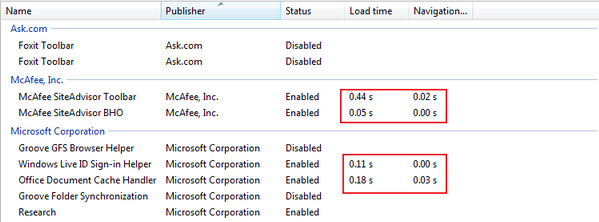
  3. You can check load time of your add-ons (and level of usage). Quite useful, you can now check how much Google Toolbar is slowing start of your browser and if you’re really using it so often, then decide if you really need it.
    add-ons management
  4. Menu has been shrunk to three small icons.
    icons IE9
    It’s far more aesthetic than menu from IE8 and takes less space on screen, so you can use it for tabs.
    menu IE8
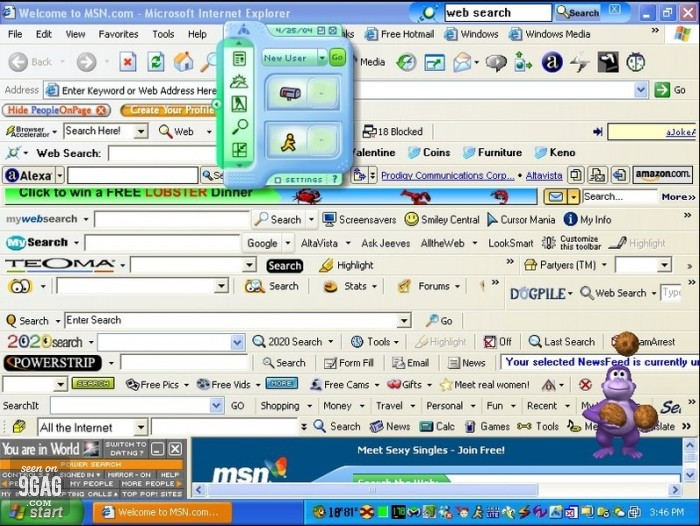
  5. Generally entire IE9 is now more minimalistic (probably because new Firefox will be as well). So for people who like their tools heavy with buttons (like on the picture below) it’ll be disappointment:)
    IE mess

But there are also things I don’t like:

Wake up your PC from WD MyBook WE

Do you want to have access to your PC from remote location, but don’t need it to be on 24h per day? And you happen to have WD MyBook WE? Then here is solution how to wake up your computer using your network storage device. Follow steps below.

  1. Enable Wake on LAN functionality on your PC - description here.
  2. Obtain MAC address of your network card - ipconfig /all. Your MAC will be visible as Physical Address.
  3. Enable SSH on your MyBook (can be done from web control panel) and redirect port 22 to it on your router, so it’ll be accessible from Internet.
  4. Install Optware Software Packages - description here.
  5. Install wakelan package - /opt/bin/ipkg install wakelan.

Now to hibernate your computer remotely execute: %windir%\System32\rundll32.exe powrprof.dll,SetSuspendState. You can create shortcut for this.

Office 365 for 1 user

I’m subscribing Technet Magazine (both US and Polish) and recently I’ve read that Office 365 is planned to be available for single user (well one person company). It was good news for me as I’m currently using Hosted Exchange from third party provider and I would really want to switch to Microsoft Exchange Online (which currently is offered to minimum 5 users). But in the same post there was written that 5 user minimum would still be valid, so I was confused. As I’m reading blog of Mariusz Kedziora and he happens to be editor of Polish Technet Magazine I’ve written to him with request to clarify it a little. His response was that 5 user minimum would stay and he wanted me to point him to paragraph where I’ve read about single user. I’ve sent him excerpt and lost any hope as he was not replying. But today I’ve received email from Marcin Górny (Advocacy Specialist - whatever that means) and he confirmed that indeed there is a plan to introduce single user version, but currently he can’t share any more information.

What I don't like in OWA 2010

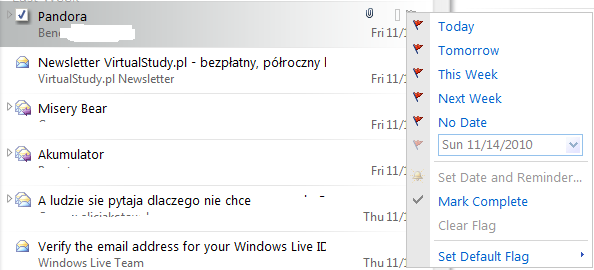
Few posts ago I’ve written about things I like in new Outlook Web App. Now I must write about something I don’t like. New Outlook (and OWA as well) introduced view called conversations which means that your emails exchanged with given person and on given subject would be gathered in one group. It’s pretty convenient and I like it. What I don’t like is the fact that if you have conversations switched on in OWA you can’t use Set Date and Reminder option for emails, it’s simply disabled as visible on the picture below.
Disabled

What I like in OWA 2010

With the release of Exchange 2010 Microsoft introduced new Outlook Web Access App (OWA), BTW. I’ve preferred old name. It’s quite amazing improvement and here is the list of things I like the most:

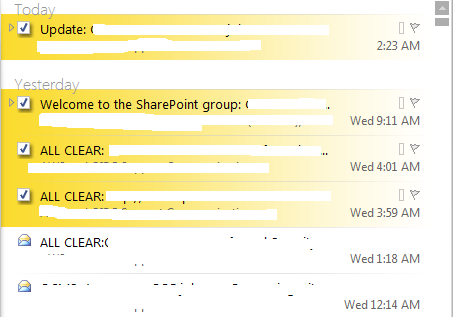
  1. Tick boxes when selecting messages. Now you can simply select multiple items without necessity of holding Control button. Really nice functionality, I wonder why Outlook 2010 doesn’t have it?

Remote Desktop Gateway

Remote Desktop Gateway is a role of Windows Server that allows you to connect with hosts in your network through its encrypted gateway. I’m quite impressed by this service and decided to write a little HowTo, so it would be easier for others to deploy it. I’ve actually hit two birds with one rock, because I’ve written it using xml and php, so it was opportunity to learn something useful. Final effect can be seen here. As you’ll notice thanks to xml and simple php form you can choose between English and Polish version of text.

Microsoft KIN

Microsoft announced new KIN phones. You can see them below. Take a look at the one on the left and let me say WTF?

Everything is dangerous

Looks like really every program can be harm to your computer these days. I’m reading US CERT reports regularly and yesterday I’ve read this one. Long story short software included with the Energizer DUO USB battery charger contains a backdoor that allows unauthorized remote system access. It’s very serious as attacker can gain complete access to machine (however with privileges of currently logged user, so if you’re not using admin account all the time it’s not so serious, but how many Windows users do that). Software leaves possibility of attack on TCP port 7777 and after gaining access such activities are possible: ability to list directories, send and receive files, and execute programs. Read more in the original report. Who would even suppose that software which shows you progress of charging your batteries can bring such vulnerability? This happens when developers don’t pay attention to security, would it ever change? Ehh.

First fail of Windows 7

I’m using Windows 7 on my desktop for some time now, I’ve upgraded from Vista. Yesterday I’ve shutdown the system normally, without any problems. Today after start and logging into I’ve noticed that wallpaper is changed and then message appeared that I was logged into a temporary profile and have no access to my files. WTF?! I’ve logged off and started my Mac to catch up with few things meanwhile. Log off process was on for about 15 minutes, so I’ve finally gave up and turned off machine then turned it on again. Selected to start Windows normally in after crash dialog and voila my profile has been launched without problem, I have all my files and settings. Windows is strangest system, really. Next time somebody would ask me why I prefer Mac OS I’ll point him to this post. Just hope that it was single instance of this issue, will make a new backup though, just in case.