Don’t do that in Excel

Excel isn’t maybe great, but it’s useful for many things. That being said, I don’t use it at all in private life. But am using it a lot, not to say too much, at work:( It wouldn’t be so bad if Excel files produced by humans were also used/edited only by humans and Excel files produced by machines were also used/edited only by machines. Usually, it’s a mix. And it’s the basis of most problems I’ve encountered with Excel files. Not saying machines are perfect and people always do Excel wrong, but in most cases when something goes wrong it’s because of human. And I can’t influence machines, so in this post I’ll try to list things you should avoid when creating/working with Excel files which will be consumed by a machine.
Sometimes you have to do what you hate to do

Being engineer/programmer is generally a blessing, as most of the time one does what one likes (loves) most. I can perform even some tedious tasks if they’re related to a field I like, or a technology I appreciate. But sometimes I have to work with things which evoke a sense of almost disgust.

Member of my team has to work with PowerPoint presentations. These presentations have charts which in turn take their data from embedded (or externally linked) Excel files. One of the repetitive tasks is updating charts based on changes to Excel files (usually caused by translation). It’s not very nice thing to do, especially if you have a lot of these presentations.

CsvHelper vs Sep in the land of bad CSVs

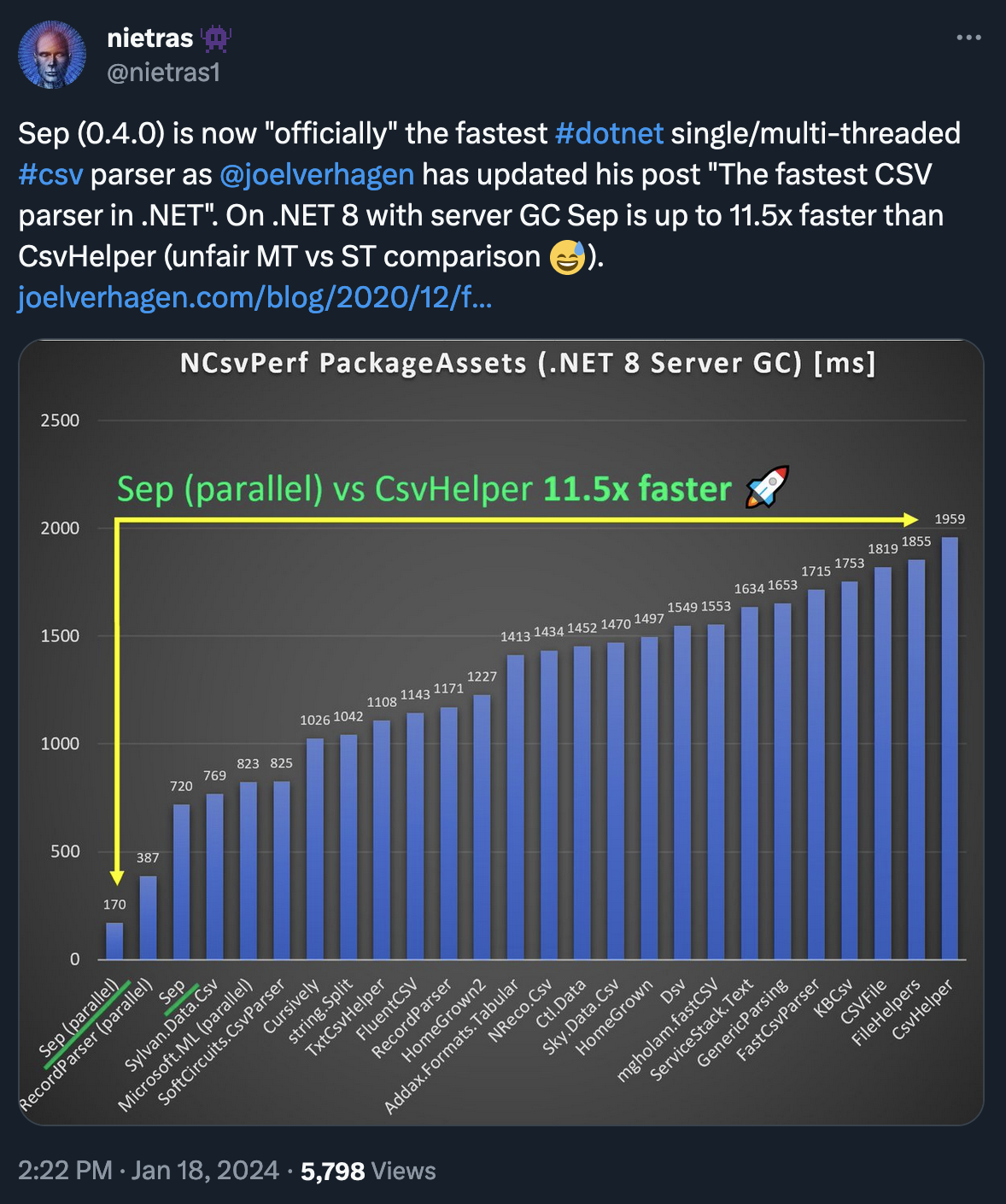
Periodically I see following tweet where author of Sep praises it for being the fastest .NET CSV parser. And rightly so, it’s super fast, and works great. If your CSVs are well formed.

Sep performance

I’ve allowed myself to retweet the above with a comment:

It’s fast alright. And nice to use, although not so easy as CSVHelper. So, if you have these perfect CSVs (author claims Sep is relaxed on standard, but in reality not so much) I can fully recommend it. However, if you’re receiving a broken CSV/TSV files, CSVHelper is better.

AoC 2022

From edition to edition I’m less ashamed to show my code, even if I’ve failed to solve a challenge. Or if my solution was pretty stupid. And I believe it’s good, as it helps me to learn and there’s nothing shameful in trying your best.

I’ve also improved my Vim skills as I was mainly coding on my iPad connected to my server via SSH. It was a challenge at first, but now I kind of like it. I’ve never really used visual selection, but now was forced to and quite enjoyed it. I’ve also learnt that if you don’t have escape key you can press Ctrl+[ instead. Now, about the challenges.

To the best of my knowledge...

If only people would use this phrase more often instead of “it’s impossible”. Recently I’ve heard that it’s impossible to export LQA settings from memoQ server via API. And I’ll use this post to explain it’s not true. Plus, I believe it would be interesting to get familiar with a bit broken format of mqres file. Which is an XML, like most things in memoQ’s world.

We’ll start by downloading the settings. First, you need to know what to download and for that we’ll use ListResources(ResourceType, LightResourceListFilter) method from Light resource API. As you can see it take two arguments, first is enum ResourceType from which you want LQA. The other one is LightResourceListFilter where you can specify LanguageCode and/or NameOrDescription to search for. You’ll receive back an array of LightResourceInfo from which you actually only need Guid.

Host your own git

I have a personal git server for several years now, but I’ve used GitHub for “brag” code. It was easier, GH is well known and I could even collaborate with others from time to time. However, recently GH has, not blocked me as I could still manage my repos and commit code, but flagged my account. Which means it was not visible to the public. There was no email notification about it. I’ve noticed it only after I’ve visited GH via browser. I was working on a new code for some time, but haven’t noticed as I was using SSH. So, I’m not even sure when I was flagged. And why? They say it was bot marking me by mistake, but then why now?

Basic Computer Games

My first computer was Atari 65 XE. We’ve bought it from some friend of my uncle. I’ve received it with lots of games and quite a collection of computer magazines and literature. These were the days when your magazine printed full code listings which you could then type into your computer and have a working program, or a game. It was usually in Basic. I’ve never did it. I was about 10 then. Couldn’t focus so much. Had lots of video games and other stuff to do. Back then kids actually spent time outdoors, you know. So, I’m not one of this wonder kids who started coding at the age of 5 and at the age of 10 they’ve built their own kernel or at least some AI. But I’ve fallen in love with computers and always wanted to work with them. There was also some hidden magic behind Basic which I’ve felt, even though I’ve never really coded in it.

Analyze JSON library

JSON files shouldn’t contain a lot of data, but sometimes they do. Recently I’ve received huge JSON file. It consisted of more than 100k lines and had more than 300 unique keys (attributes if you will). In memoQ you can create a filter for JSON files and then you can define which keys should be translated. You need to add your JSON to the filter and then populate the list of keys, then you can edit this list either in flat or structural view. In flat mode you simply set which keys should be translated and which not. You’re receiving a list of unique keys, so in case of 300 keys you need to make 300 decisions. Probably even less as default is to translate given key, so you only need to mark what shouldn’t be translated. In structural mode you’re dealing with the structure as present in given JSON, so if given key has been used 10 times in JSON, you’ll have to make 10 decision. Multiply this by 300 keys and… It’s a nightmare. And it works like memoQ’s XML filter (no matter the key editing mode), so if you’ll mark as non-translatable key which contains another key which should be translated, the value of inner key won’t be imported. Which is as expected and correct. You can circumvent it by using strongly translatable option, but I wouldn’t go this way. You can loose track pretty quickly.

If you really don't want duplicates in you TMs

As per memoQ’s help page this is what causes your Translation Memory to store duplicated translations:

Translation memory may have duplicate entries after the import: This happens if the translation memory allows multiple translation for each source segment, or when the translation memory uses double context. In the latter case, you may want to remove the duplicates because the context is not relevant. To get rid of duplicate entries, open the translation memory for editing. In the translation memory editor, filter the translation memory for duplicates. To learn more: See Help about the translation memory editor.

Advent of Code 2021

Another year and another adventure. AoC doesn’t disappoint. It somehow was better for me this year, even though I’ve got lower score. It’ll sound as an excuse, and maybe it is, but I’ve started new job in December. So, I couldn’t spent whole day dealing with the problems, as I had to focus on my new role. And this was actually a good thing. Yes, I’ve gained less stars. But, I wasn’t spending a lot of time poking around, and basically running circles. Instead, I’ve tried few things and then had to do other stuff, so it’s given me time to refresh my mind and start clear. The overall score is lower, but I’ve spent probably 4-5x less time on these riddles than last year. Well, maybe I’ve got a little bit better as well;)